VPN for Android

The fast, no-logs VPN app for Android

Protect your Android phone or tablet with military-grade encryption, a strict no-logs policy, and one-tap privacy. Unblock content, stop trackers, and stay safe on any Wi-Fi — across 127 locations worldwide.

AES-256 & ChaCha20 No-logs 127 locations
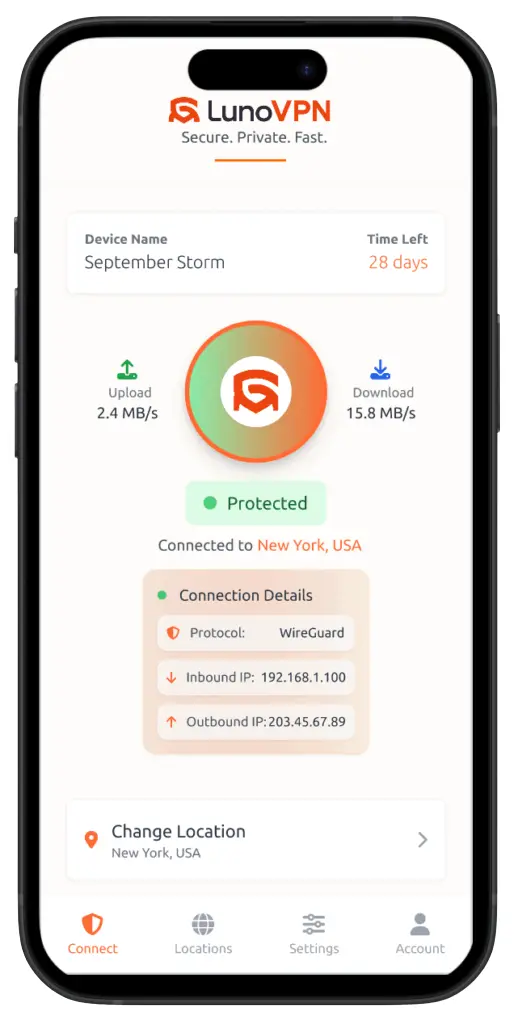
LunoVPN Android app connected and protected, showing WireGuard-based LunoGuard and hidden IP
Overview

Why you need a VPN on Android

Your Android phone is with you everywhere — and it’s constantly connecting to networks you don’t control. Without a VPN, your mobile carrier, Wi-Fi provider, and the apps themselves can see your real IP address and profile what you do. A VPN for Android wraps every connection in strong encryption, so your traffic stays private on any network.

LunoVPN is a lightweight native Android app that protects your whole device with a single tap. It hides your IP behind one of 127 server locations, encrypts your DNS to prevent leaks, and keeps a strict no-logs policy — so there’s nothing to hand over about what you browse, stream, or download.

What a VPN does on your Android phone

Technology

Built on modern, mobile-first tech

The same engineering that powers LunoVPN everywhere, tuned to be fast and gentle on your Android battery.

LunoGuard protocol

Our WireGuard-based protocol delivers near-instant handshakes and high throughput on mobile.

AES-256 & ChaCha20

AES-256-GCM and ChaCha20-Poly1305 — ChaCha20 is ideal for phone CPUs and battery.

RAM-only, no-logs

Diskless servers wiped on reboot, with a strict zero-log policy baked in.

DNS leak protection

Every lookup is encrypted and routed through the tunnel — never your carrier’s DNS.

Kill switch

If the tunnel drops, all traffic is blocked instantly so nothing leaks.

Obfuscation

Disguises VPN traffic as HTTPS to get through restrictive mobile networks.

Split tunneling

Choose which apps use the VPN and which connect directly.

Battery optimized

Efficient keep-alives and ChaCha20 keep power use low all day.

Live demo

Watch your data get encrypted

Everything leaving your Android is scrambled with military-grade encryption. Switch the cipher and see your readable data turn into unreadable ciphertext:

Your data (readable)
On the wire (encrypted)
Illustration of the concept. LunoVPN uses authenticated encryption (AES-256-GCM) so intercepted traffic is meaningless to anyone but you.
Live demo

Route each app your way

Split tunneling lets you send sensitive apps through the encrypted tunnel while trusted or local apps connect directly. Flip each app and watch it move:

Your apps
Through LunoVPN 0 apps
Direct connection 0 apps
Live demo

If the tunnel drops, nothing leaks

On mobile you switch between Wi-Fi and data all the time. If the VPN ever drops mid-switch, the kill switch blocks every app instantly — press the button to simulate a drop:

Your Android
LunoVPN
Internet
ProtectedTraffic encrypted · your real IP is hidden.
Setup guide

How to set up a VPN on Android

Installing LunoVPN on your Android phone or tablet takes under a minute, straight from the Google Play Store:

Install from Google Play

Open the Play Store, search for LunoVPN, and tap Install — or use the button below.

Sign in

Open the app and sign in with your LunoVPN account number or credentials.

Allow the VPN connection

Android will ask permission to set up a VPN — tap OK once to trust LunoVPN.

Choose a location

Pick from 127 locations, or let Best for You select the fastest server.

Tap Connect

One tap and your entire phone is protected. That’s it.

Download on Google Play
Compatibility

Works on phones & tablets

LunoVPN runs on modern Android devices — phones, tablets, and beyond:

Android phones Android tablets Android 8.0 and newer Up to 5 devices
At a glance

What to look for in an Android VPN

FeatureWhy it matters on AndroidLunoVPN
Strict no-logsYour mobile activity stays privateYes
AES-256 & ChaCha20Strong, battery-friendly encryptionYes
Kill switchNo leaks when switching Wi-Fi / dataYes
Split tunnelingPer-app control on mobileYes
ObfuscationConnect on restrictive networksYes
Battery optimizedAll-day protectionYes
Unlimited bandwidthNo caps on mobile data through the VPNYes
FAQ

Android VPN — frequently asked questions

Do I need a VPN on my Android phone?
If you use public Wi-Fi, bank or shop on your phone, or want to keep your browsing private from your carrier and apps, a VPN is well worth it. LunoVPN encrypts every app on your device and hides your IP with a strict no-logs policy.
How do I download LunoVPN for Android?
Install it from the Google Play Store: open Play, search for “LunoVPN,” tap Install, sign in, allow the VPN connection, choose a location, and tap Connect.
Is LunoVPN for Android really no-logs?
Yes. LunoVPN runs on RAM-only servers that are wiped on reboot and keeps a strict zero-log policy, so there’s no record of what you browse, stream, or download.
Which encryption does the Android app use?
LunoVPN uses authenticated AES-256-GCM and ChaCha20-Poly1305 over the WireGuard-based LunoGuard protocol. ChaCha20 is especially efficient on phone processors, which helps battery life.
Will a VPN drain my Android battery?
LunoVPN is built to sip power — the lightweight LunoGuard protocol, ChaCha20 cipher, and efficient keep-alives keep battery use low enough to leave it on all day.
Does the kill switch protect me when I switch Wi-Fi to data?
Yes. If the tunnel ever drops while you move between networks, the kill switch blocks all traffic instantly so your real IP and data never leak.
Can I choose which apps use the VPN?
Yes. Split tunneling lets you route selected apps through LunoVPN while others connect directly — useful for banking apps that dislike foreign IPs, or local services.
How many devices can I use?
A single LunoVPN account supports up to 5 devices, so your Android phone, tablet, and other gear are all covered.
Is using a VPN on Android legal?
Using a VPN is legal in most countries. You’re responsible for following your local laws and the terms of the services you use. LunoVPN keeps no logs of your activity.
Explore more

Related LunoVPN guides & features

Get the best VPN for Android

Fast, private, and no-logs — protect your phone in under a minute.

Get it on Google Play
© 2025 LunoVPN — We don’t know who you are, and that’s by design.
Proudly engineered by LunoVPN