
Why you should use a VPN on public Wi-Fi
That free café, airport, or hotel network is convenient — and it’s one of the easiest places in the world for someone to intercept your data. Here’s exactly how, and how a VPN stops it.
July 2, 2026 · 10 min read
TL;DR — On open Wi-Fi, anyone nearby can potentially see or tamper with your traffic through sniffing, man-in-the-middle, and evil-twin attacks. HTTPS helps but leaks metadata and can be stripped. A VPN wraps everything in one encrypted tunnel, so the local network — and any attacker on it — sees only scrambled data.
Public Wi-Fi feels harmless. You open your laptop at a coffee shop, tap “connect,” and you’re online. But the very thing that makes it convenient — no password, instant access, shared by everyone — is also what makes it dangerous. On most open networks, you are sharing the air with strangers, and some of them may be listening.
This isn’t hypothetical or rare. The tools to attack open Wi-Fi are free, well-documented, and run on a cheap laptop. Let’s look at how these networks actually work, the specific attacks they enable, and why a VPN is the one control that neutralises all of them.
Why open Wi-Fi is insecure by design
A Wi-Fi network is a shared radio medium. When a network is open (no password, or a password everyone knows), the data travelling between your device and the access point is often not encrypted at the link layer. That means any device within radio range, set to “monitor mode,” can capture the packets flying through the air — no hacking of your device required.
Even “secured” public networks with a shared password (WPA2-Personal) don’t truly isolate you: users on the same network can often see or interfere with each other’s traffic. The uncomfortable reality is that on public Wi-Fi, the network itself is untrusted — and so is everyone on it.
The attacks you’re exposed to
Here’s what an attacker on the same network can actually attempt — the technical playbook:
Packet sniffing
Passively capturing all traffic in range with tools like Wireshark. Anything unencrypted — forms, cookies, DNS — is readable.
Man-in-the-middle (MITM)
Sitting between you and the router so all your traffic flows through the attacker, who can read and modify it.
Evil twin / rogue AP
A fake hotspot named “Free Airport WiFi” that you connect to willingly — handing an attacker your entire session.
ARP spoofing
Poisoning the local network so your device sends traffic to the attacker instead of the real gateway.
DNS spoofing
Answering your DNS lookups with fake results to redirect you to phishing or malware pages.
SSL stripping
Downgrading your connection from HTTPS to HTTP so “secure” pages are served in the clear.
Session hijacking
Stealing session cookies off unencrypted connections to log into your accounts as you — no password needed.
Malicious captive portals
Fake “sign in to Wi-Fi” pages that harvest credentials or push malware before you reach the internet.
What an attacker captures from your traffic
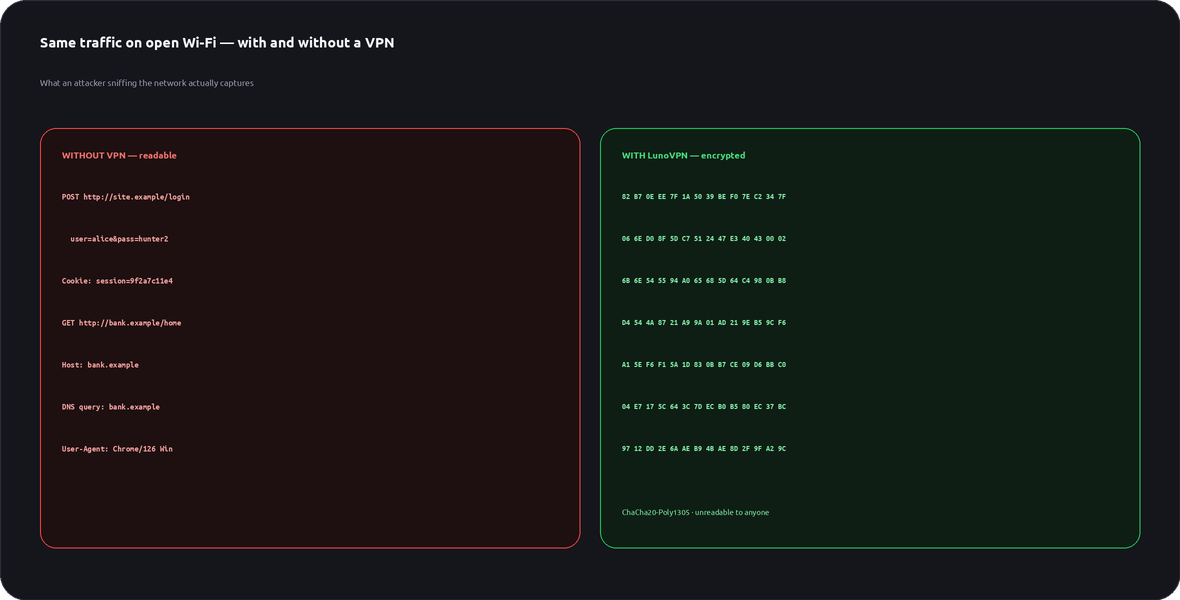
A passive sniffer records everything on an open network. Toggle your VPN to see the exact same traffic go from readable to unreadable:
Illustrative demo. Without a VPN the attacker reads logins, cookies and domains; with LunoVPN they capture only ChaCha20-encrypted noise.
“But I only use HTTPS” — why that’s not enough
HTTPS is essential and it does encrypt the content of your connection to a website. But it is not a complete shield on a hostile network:
- DNS & SNI leak the domains you visit. Even with HTTPS, the network can usually see which sites you connect to.
- SSL stripping & downgrade tricks. Attackers can try to keep you on plain HTTP, especially on the first request before a redirect.
- Not everything uses HTTPS. Background app calls, some IoT and older services still send data in the clear.
- Certificate warnings get clicked through. A rogue portal can present a fake certificate that many users accept.
- Metadata is still exposed. Timing, sizes, and destinations reveal a lot even when content is encrypted.
A VPN closes these gaps by encrypting all traffic — including DNS — and routing it through a single tunnel to a trusted server, so the local network can’t see destinations, can’t strip your encryption, and can’t inject anything.
What’s exposed on each kind of network
Pick a network, then flip the VPN. See what a nearby attacker can access in each case:
How a VPN neutralises the whole network
A VPN doesn’t patch each attack individually — it removes the attacker’s access to your data entirely. From the moment you connect, your device builds an encrypted tunnel to a LunoVPN server. Everything — web, apps, and DNS — travels inside that tunnel:
Everything is encrypted
AES-256 or ChaCha20 wraps all traffic. A sniffer captures only unreadable ciphertext — no logins, no cookies.
DNS runs inside the tunnel
Your lookups can’t be seen or spoofed by the local network, so the domains you visit stay private.
Tampering is blocked
The tunnel is integrity-protected, so SSL stripping and content injection simply fail.
Kill switch + auto-connect
LunoVPN can auto-connect on untrusted Wi-Fi and cut traffic if the tunnel drops — so you’re never accidentally exposed.
Even on an evil twin hotspot run by the attacker themselves, the tunnel holds: they route your encrypted packets but can’t read or change them. The hostile network becomes just a dumb pipe.
Your public Wi-Fi checklist
- Turn on your VPN before you browse. Connect LunoVPN the moment you join any public network.
- Enable auto-connect & the kill switch. Protection shouldn’t depend on you remembering.
- Verify the network name. Ask staff for the exact SSID — evil twins copy real names closely.
- Turn off auto-join & file sharing. Don’t let your device silently reconnect or expose shares.
- Avoid sensitive logins without a VPN. Banking and email can wait until you’re protected.
Turn any Wi-Fi into a private connection
LunoVPN encrypts everything the moment you connect — café, airport, or hotel. No sniffing, no MITM, no worries.
Get LunoVPN